


RadarNow! ®
4.827.13K Reviews
App Specs
- Version
- 7.2
- Updated On
- License
- Free
- Downloads
- 5,000,000+
- Developer
- USNaviguide LLC
- Categories
- Weather
- Platform
- Android, iOS
Screenshots
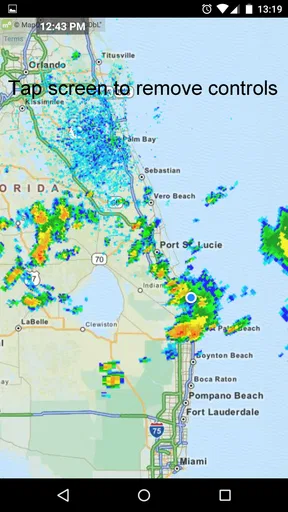
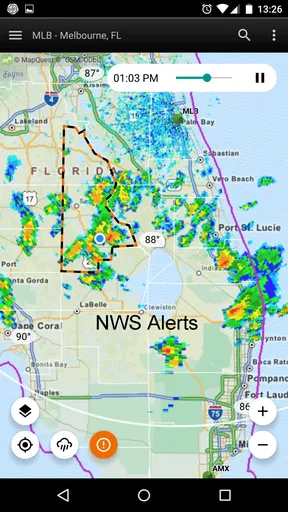
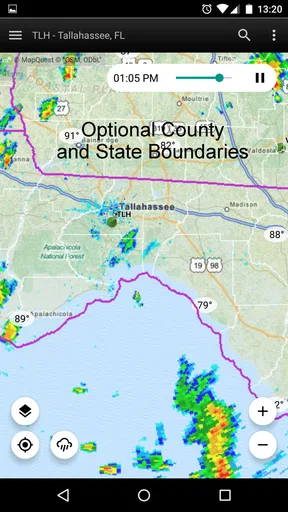
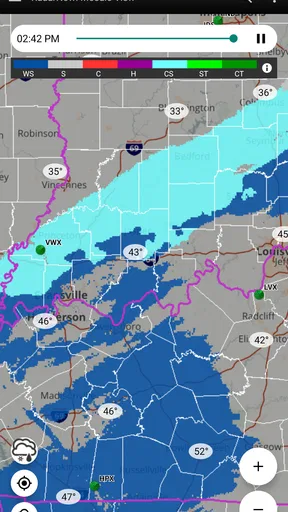
 Analysis by AppCompare
I know the small uncertainty that can throw off an ordinary day: the sky looks fine when I leave, but I still wonder whether rain is moving toward my route. Opening a full forecast app can mean navigating several screens when all I need first is a quick look at the radar. RadarNow! ® is built around that simple check. It is a weather app from USNaviguide LLC, and its focus is seeing what precipitation is doing nearby rather than turning every glance into a broad forecast session.
When a quick radar check is worth it
Radar is most useful when the question is immediate: should I take the dog around the block now, bring a jacket for the walk to the bus, or move a short outdoor task indoors? For those decisions, a map showing weather approaching can be more practical than a general daily forecast. I find the appeal is less about studying meteorology and more about cutting down the time spent guessing.
That distinction matters. Radar can help me judge whether rain appears to be moving toward my area, but it is not a promise about exactly what will happen at my front door. Local conditions can change, and a radar view is only one part of making a sensible plan. I would use it to inform a choice, not to treat a clear patch on the screen as a guarantee that the next hour will stay dry.
A useful first routine
My practical approach is to open the map, check where I am, and look at the direction and movement of the weather before deciding whether to leave. A quick glance is often enough for a nearby errand; if the choice matters more, I give the display a moment and compare what it shows with the conditions outside. Keeping that small routine consistent makes the radar easier to interpret than opening it only when a storm is already overhead.
It is also worth deciding what you want notifications to do for you. Alerts can be helpful if you would rather be interrupted than remember to check, but frequent notifications can become noise if you only care about rain when you have plans outdoors. I would tailor the alert choices to the situations that actually affect my day, then use the map for a deliberate check when timing matters.
Everyday plans, not just storm watching
Picture a weekday when I am about to walk to a nearby appointment. The forecast may have mentioned showers, but that alone does not tell me whether I should leave now or wait a little. A radar check gives me a more immediate visual cue. If weather appears to be approaching, I can take an umbrella or adjust when I set out; if not, I can avoid carrying extra gear for no reason. That is a modest benefit, but it is exactly the kind of repeated decision where a focused tool can save friction.
The same habit can help when I am planning a run, taking children to a playground, or deciding whether to finish a short job outdoors. It is especially useful when plans are flexible and a few minutes either way make a difference. For a full-day trip, severe-weather planning, or a decision with safety consequences, I would check a broader forecast and relevant official guidance as well. Radar is a useful view, not a replacement for every kind of weather information.
Worth Reading Before You Choose

EA SPORTS FC Mobile 26 Is a Bigger Football Game, but It Takes Time

Flipboard Shows What News Apps Must Do Beyond the Feed

Switching to Android Auto Means Rethinking Your Driving Routine

Google Calendar Makes a Crowded Week Easier to Manage

Ludo King Makes the Most of the Minutes Between Plans

Baby Panda World Brings Quick Play to Modern Phones, but Its Game Library Feels Busy
How it fits beside other weather apps
Many weather apps combine forecasts, hourly charts, maps, widgets, and other information in one place. That breadth is handy when I want to compare tomorrow with the rest of the week, but it can make a simple “is rain close?” check feel slower. RadarNow! takes the opposite approach: it puts radar at the center, which suits someone who values a direct visual answer over a large collection of forecast tools.
The trade-off is straightforward. If you mainly want temperatures, a detailed multi-day outlook, or a single screen that covers every aspect of planning, a broader weather app may be a better primary choice. I would see this one as a focused companion for checking nearby conditions, or as the main option for someone whose most common weather question is about precipitation. Its usefulness comes from that narrower job, not from trying to replace every forecast service.
Who will get the most from it
I would recommend it to commuters, walkers, runners, gardeners, and anyone whose plans regularly depend on whether rain is nearby. It also makes sense for people who prefer a map to a list of forecast numbers. The store presents it as free, with in-app purchases listed at $18.99 per item, so I would check the purchase details in the app before deciding whether any paid option is relevant to me. Its Everyone age rating makes it broadly suitable, though the right choice still depends on the weather information each person needs.
On the other hand, I would skip it as my only weather app if I needed extensive forecast planning or wanted a detailed outlook for travel well beyond my current area. I would also avoid relying on notifications as my sole safety plan. Alerts are convenient, but the sensible workflow is to use them as a prompt to check conditions, especially when a decision affects travel or outdoor activity.
Quick and Simple Access
What I love about RadarNow! is its simplicity. You know those apps that make you jump through hoops just to get a basic update? Yeah, this isn’t one of them. As soon as you open the app, it delivers live radar information without any fuss. It’s like having a meteorologist tucked away in your pocket, ready to spill the latest weather gossip.
Intuitive Interface
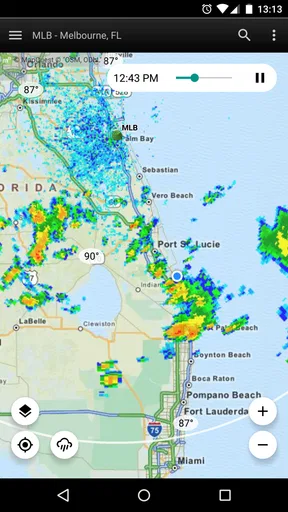
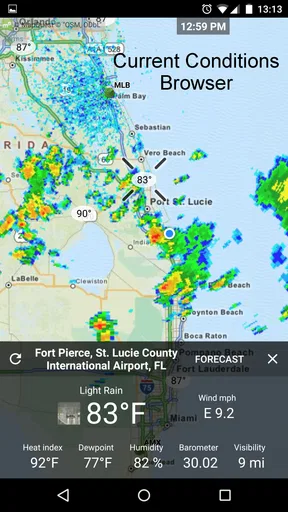
Let’s talk about the interface for a sec. The design is straightforward, which is a breath of fresh air for those of us who aren’t tech wizards. You get a clear view of the radar, pinpointing your location and showing any approaching weather systems. The colors and animations are smooth and easy on the eyes, making it a breeze to interpret what's happening in the skies above.
Real-Time Alerts
Getting caught in a sudden storm is no fun, and that’s where real-time alerts come into play. The app sends notifications if there are significant weather changes in your area. This feature is super handy, especially if you’re planning a day outdoors or have a long commute. It’s like having a personal weather assistant whispering updates in your ear.
Data Accuracy
Accuracy is king when it comes to weather apps, and thankfully, RadarNow! doesn’t skimp in this department. The data is sourced directly from the National Weather Service, ensuring you get the most precise updates. This level of reliability is crucial, especially if you’re someone who likes to plan their day around the weather.
No Frills, Just Functionality
While some apps try to dazzle with countless features, RadarNow! keeps it real by focusing on what matters: the radar. There’s no clutter or unnecessary options, which means you get straight to the point. It’s perfect for users who want quick information without sifting through endless menus.
Battery and Data Usage
We’ve all been there – an app that drains your battery faster than you can say “raincoat.” Thankfully, this isn’t a concern here. RadarNow! is designed to be light on both battery and data usage, so you can keep it running in the background without worrying about your phone dying or your data plan taking a hit.
Customization Options
Although the app is straightforward, it doesn’t mean you can’t personalize it a bit. There are options to adjust the radar's appearance and choose which type of weather alerts you want to receive. This flexibility lets you tailor the app to best suit your needs.
What I would check before depending on it
One question people often have is whether a radar app can tell them precisely when rain will reach their street. I would not use any moving map as an exact countdown. Its real value is showing a broader pattern that can help me decide whether to bring cover or reconsider an outdoor plan. If timing is important, I check again closer to leaving instead of assuming that one earlier glance settles the matter.
Another practical question is whether it makes sense to keep alerts enabled all day. For me, that depends on how often weather changes affect my routine. Someone with a flexible schedule may prefer to open the app when needed; a person who commutes outdoors may welcome a timely nudge. Choosing only alerts that matter is a better balance than treating every notification as urgent.
For a first-time user, I would keep setup simple: get comfortable reading the radar around the location that matters, then adjust appearance and alert choices only if they improve that quick check. Too much tinkering can defeat the point of a direct tool. The useful test is whether I can answer my immediate question faster than I could by digging through a more crowded forecast app.
Availability and expectations
The app has a 4.9 average from around 80,000 ratings, and it has been installed over five million times. Those figures suggest that many people value its focused approach, but they do not change the basic trade-off: a radar-first app is strongest when I want a visual read on nearby weather, not when I need every forecast detail in one place. It is currently at version 7.2 and supports Android 7.0 or later, which is useful to know when checking whether an older device can run it.
For anyone comparing it with a standard weather app, I would ask one question: what do I open most often? If the answer is “to see whether rain is on the way,” the streamlined radar view is a good fit. If I usually want temperatures, a week-ahead outlook, or broader trip planning, I would keep a more comprehensive forecast app in reach instead. Using both for different jobs is a reasonable choice rather than a flaw.
In conclusion, if you’re looking for a reliable, no-nonsense weather app, RadarNow! is a solid choice. Its ease of use, accuracy, and real-time alerts make it a must-have for anyone keen on staying one step ahead of Mother Nature. So, next time you’re planning a picnic or heading out for a jog, check RadarNow! and keep the rain at bay!
Pros
- Provides real-time weather radar updates.
- Simple and user-friendly interface.
- Minimal data usage for updates.
- Customizable alert settings.
- Fast loading times for radar maps.
Cons
- Limited features in the free version.
- Ads can be intrusive at times.
- No detailed forecast information.
- Requires internet for updates.
- Limited customization for radar views.
FAQs for RadarNow! ®
What is RadarNow! and how does it work?
RadarNow! is a weather application designed to provide real-time radar images without any delay. It uses your device's GPS to show your location on the map, ensuring you get precise and accurate weather updates based on your current position. This feature is especially useful for tracking storms and severe weather conditions as they develop.
Is RadarNow! free to use, or are there any in-app purchases?
RadarNow! is available as a free app with basic features. However, it also offers a premium version through in-app purchases that unlocks additional features, such as advanced radar imagery and ad-free usage. This allows users to choose the level of service that best fits their needs and budget.
How accurate is the weather information provided by RadarNow!?
RadarNow! provides highly accurate weather data by sourcing information from NOAA radar stations. The app updates radar images frequently to ensure users have the most current weather conditions. While it is reliable, users should keep in mind that no weather app can guarantee 100% accuracy due to the unpredictable nature of weather.
Does RadarNow! drain battery quickly?
RadarNow! is designed to be efficient in terms of battery usage. It uses GPS and data connectivity only when required, minimizing battery drain. However, frequent checking of radar updates and keeping the app running in the background could increase battery consumption, as with any real-time data application.
What platforms and devices are supported by RadarNow!?
RadarNow! is available for both Android and iOS platforms, ensuring compatibility with a wide range of smartphones and tablets. The app is regularly updated to support the latest OS versions and devices, providing a seamless user experience across different hardware configurations.


